Guide
One file thousand cards.
Already have your words in a spreadsheet or notes? We will show you how to turn them into a ready deck — without retyping.
What is aCSV file.
In one sentence
CSV is a plain text file that stores a table. The first row holds column names, each following line is one row, and commas separate the columns.
| spanish | english | sample usage | |
|---|---|---|---|
| 2 | darse por vencido | give up | Nunca te des por vencido con tus sueños. |
| 3 | toparse con | run into | Me topé con Sara en la estación, por completo casualidad. |
| 4 | cuidar de | look after | ¿Podrías cuidar de mi gato este fin de semana? |
| 5 | posponer | put off | Tuvimos que posponer la reunión hasta el lunes. |
written as plain text.
What makes a card
Cards are built from a template — you map columns to its fields.
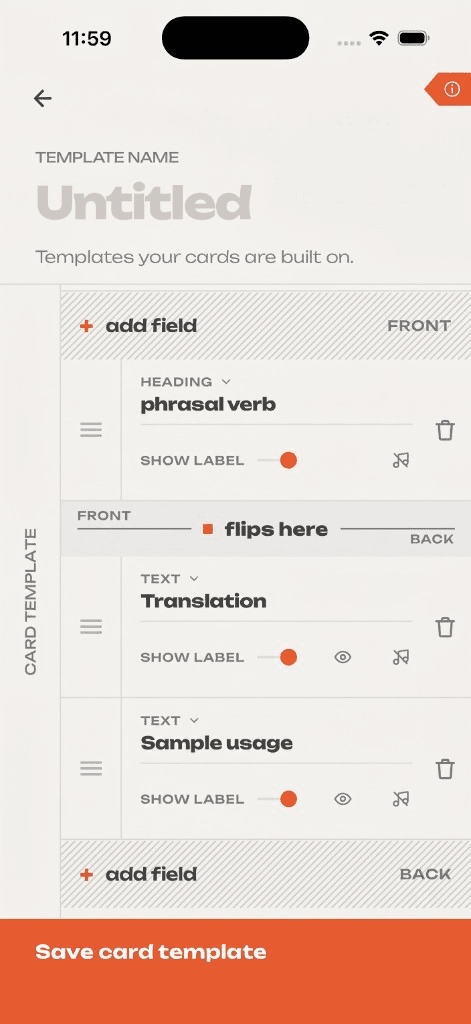
A card is not just front and back. In the app you build it on a template — a list of fields you name yourself. This is what the template editor looks like: it decides what you see as the question and what appears only after you flip the card.
Worth knowing before you prepare a file: each column in your CSV maps to one template field. As many fields as you want to fill, that many columns you need.
 12345
12345Template name
One template can serve many decks. Name it so you will recognize it later — for example “Vocabulary with example sentence”.
Field and its name
Each field has a type (heading, text) and a name you choose. CSV columns connect to these fields — one column feeds one field.
Flip line
The most important part of the screen. Fields above it appear as the question; fields below appear only after you flip the card. Drag fields by the handle on the left.
Field label
A toggle decides whether the field name appears on the card above the content. Useful when the back has several fields you want to tell apart.
Save template
Once saved, the template is ready. On import you only point each field to the right column.
Prefer to watch
What CSV is — in a few minutes.
If you would rather listen than read: a short explanation of what the format actually is and why every program understands it.
You do not need to watch it to upload your words — everything you need is on this page below.
You do not need to configure anything. The app will recognize your file.
comma · semicolon · tab — any of themNo vocabulary yet?Ask AI.
Shortcut
ChatGPT, Claude, or Gemini can prepare a list in the right format.
Copy the template, replace the [bracketed] fields with yours, and save the reply as a file.
AI can get facts wrong or invent content — skim a few rows before you upload.
Copy the template, replace the [bracketed] fields, and paste it into your AI chat.
Save the reply as a .csv file — plain table text only, no commentary or markup.
Upload the CSV to flshcrds and map the columns to your card template fields.
A few thingsworth remembering.
No stress
Most of this your spreadsheet handles when you save. Come back here only if something does not work the first time.
Put column names in the first line
Easiest is to use the same names as your template fields — for example spanish and english. That line is not a card, just a table header.
Do not worry about the separator
Comma, semicolon, tab — whatever your program uses to split columns, the app will detect it. Save the file the way it exports by default.
Wrap sentences with commas in quotes
Otherwise a comma inside the sentence splits it into two columns. Like this: "Me topé con Sara en la estación, por completo casualidad." — or let your spreadsheet do it on export.
One setting worth checking
When saving, choose UTF-8. Without it, characters like ä ö ü é è ç ñ ż ć turn into garbage. Google Sheets always gets this right.
Empty fields are fine
No example sentence for every entry? Leave the cell empty. In the file it looks like: posponer,put off, — the separator stays, there is just no content.
Save asCSV.
Most spreadsheets and text editors let you save a table as CSV. Below is where to click in popular apps.
The simplest path. Nothing to configure — it always works.
File → Download →Comma-separated values
(.csv)
On the format list, pick the one labeled UTF-8. Plain “CSV” can break characters.
File → Save As →CSV UTF-8
Expand advanced options and set encoding to Unicode (UTF-8).
File → Export To →CSV → Advanced
options
Type your words line by line and save with a .csv extension.
Save As →Encoding: UTF-8 →
name.csv